3.3 Active Tracking
Your live logging cockpit for during-workout tracking.
The Track Widget is the core logging interface of the IronSet app, designed for use during your workout. It provides a real-time view of your performance, easy-to-use logging controls, and instant visual feedback. Here is a detailed breakdown of its interface and functionality.
1 The Active Workout Card (Top)
This card serves as your immediate target reference. It displays:
- Current Exercise — The specific movement you are currently tracking.
- Target vs. Estimate — It shows your current planned set (e.g., 60kg × 8) side-by-side with an "Est" (Estimate). The estimate tells you what you should be capable of based on your historical strength, helping you decide if you can push for more reps.
-
Live Metrics:
- Performance — A real-time score of how well you are performing compared to your historical best.
- Fatigue — A calculation of how much your strength is dropping as you progress through your sets.
- Intensity Warning — It calculates your training intensity. If you are training too heavy (high intensity) or too light, the widget displays a color-coded warning (e.g., "Avoid high intensity") to help you stay within your optimal training zone.
2 Quick Logging Controls (Middle)
-
Designed for "gym-brain," the controls are large and
simple:
- Reps & Weight Toggles — Large input areas to quickly adjust the numbers for the set you just finished.
- Tilt-to-Adjust — If enabled, you can actually tilt your phone left or right to increase or decrease your rep count — perfect for when your hands are sweaty or you're wearing gloves.
-
The "Add Set" Buttons:
- Easy/Normal Set Green — A large button to log a successful set.
- Failure Set Red — A dedicated button to log sets where you reached muscle failure.
Visual Confirmation: When you log a set, a large 💪 overlay appears briefly on the screen, giving you clear confirmation that your data was saved without needing to squint at small text.
3 Real-Time Performance Chart (Bottom)
The bottom half of the widget features a dynamic line chart that visualizes your workout:
- Today vs. History — It plots your current sets (Blue line) against your "Baseline" from your last session (Gray line). This gives you an immediate visual of whether you are "beating" your past self.
- Volume Estimation — It can show an "Est" (Red line) which predicts your total volume for the session, letting you know if you're on track for a Personal Record (PR).
- Interactive Dots — You can tap on the data points in the chart to see specific details about that individual set.
4 Hands-Free & Calibration
- Tilt Calibration — The widget is built to work with the app's Tilt Navigation system, allowing you to scroll or interact with the interface by moving your device.
- Auto-Scroll — During Autopilot mode, the widget automatically updates to show the next recommended exercise, so you never have to manually search for what's next.
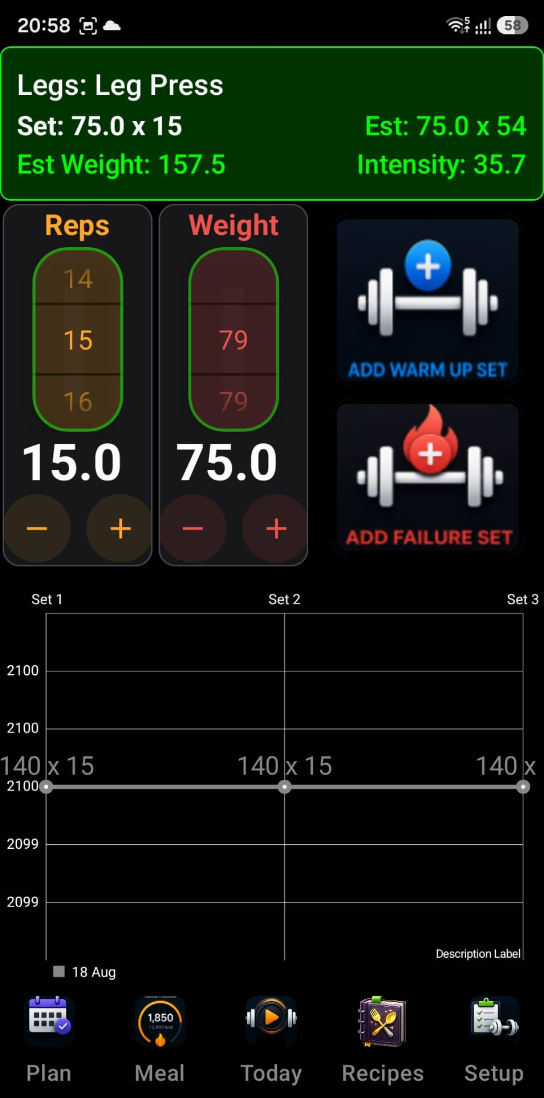
The Track Widget is your "Live Cockpit." It takes the guesswork out of your session by showing you exactly what you need to do to progress and giving you the easiest possible way to log your results.