4.3 Recipe Logging
Your personal digital cookbook and meal-prep assistant.
The Recipe logging is your personal digital cookbook and meal-prep assistant. It allows you to create complex meals (recipes) from multiple ingredients, calculate their nutritional value per portion, and log them to your daily history with a single tap. Here is a detailed breakdown of its interface and functionality.
1 Recipe Management (The "My Recipes" List)
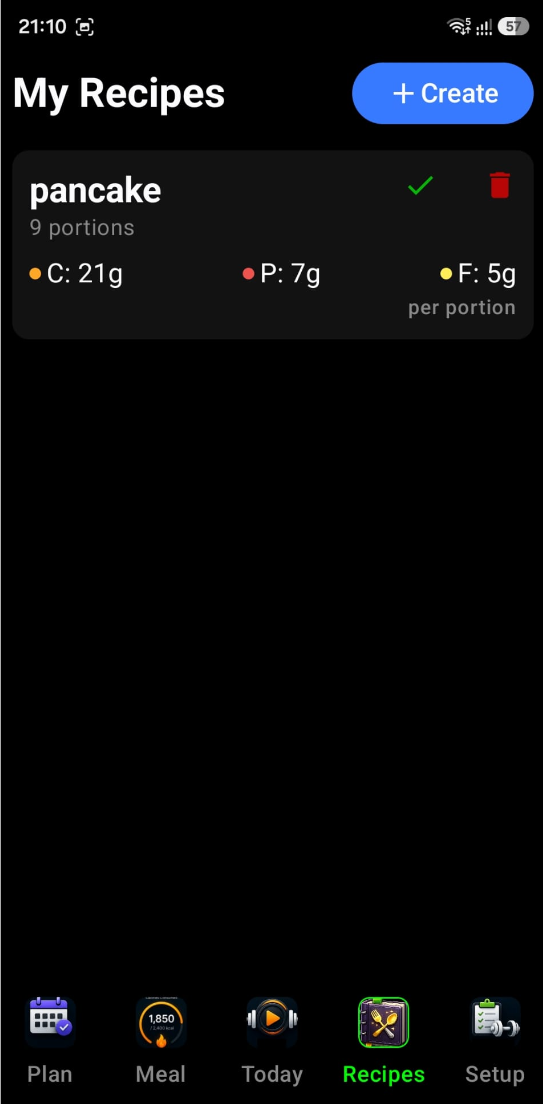
The main screen provides a clean, searchable list of all your saved recipes:
- Search & Filter — A dedicated filter bar at the top allows you to quickly find specific recipes as your collection grows.
- Macro-at-a-Glance — Each recipe card displays its total Carbs, Protein, and Fats per portion, so you know exactly how a meal fits into your daily targets before you eat it.
-
Quick Actions:
- Log (Checkmark ✓) — Instantly adds one portion of that recipe to your daily meal history.
- Edit (Pencil ✎) — Opens the editor to modify ingredients or portions.
- Delete (Trash 🗑) — Removes the recipe from your library.
2 The Recipe Editor
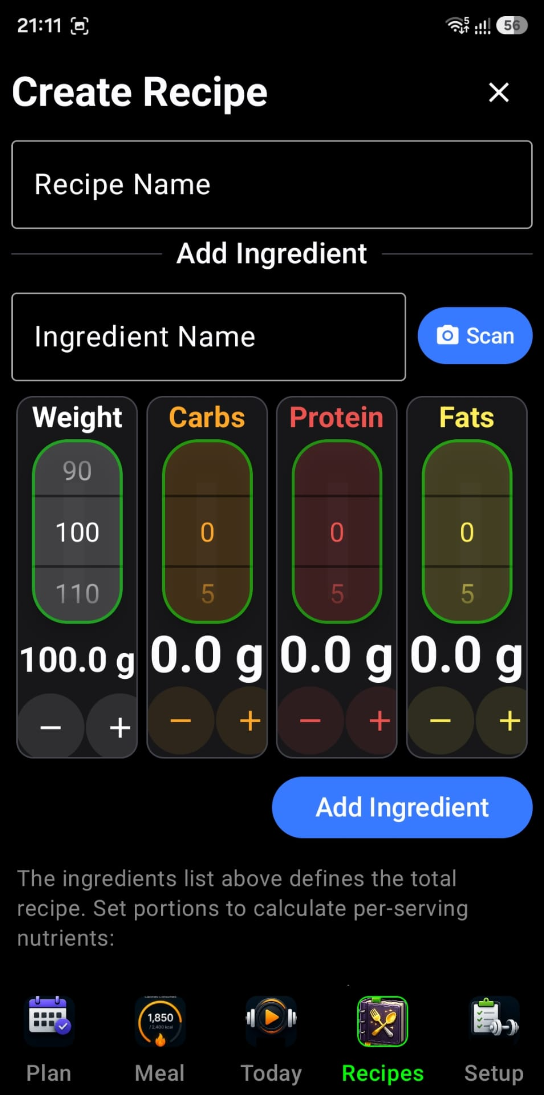
When you create or edit a recipe, you enter a specialized workspace:
- Ingredient Composition — You can add multiple ingredients to a single recipe. The app automatically sums up the nutrients for the entire batch.
- Portion Control — You specify how many portions a recipe makes. The widget then does the math to show you the nutritional breakdown of a single serving.
- Dynamic Updating — As you add ingredients or change weights, the macro badges update in real-time, helping you "balance" a recipe while you're creating it.
3 AI Ingredient Scanner Gemini AI
This is a standout feature for simplifying manual entry. While in the Recipe Editor:
- Camera Integration — You can tap the Photo Camera icon to launch the AI Scanner.
- Gemini AI Analysis — Take a photo of a single ingredient (like a chicken breast or a bowl of rice). The Google Gemini AI analyses the image to identify the food and estimate its weight and nutritional content.
- Auto-Add — The identified ingredient and its macros are automatically populated into your recipe draft, significantly reducing the need for manual typing and lookups.
4 Technical Intelligence & Sync
- History Integration — When you log a recipe, it doesn't just add a name; it logs the specific macro breakdown calculated by the recipe to your meal history.
- State Management — The widget uses a dedicated runtime persistence that ensures your search queries and draft recipes are preserved even if you navigate between different parts of the app.
- Permission Handling — It includes built-in logic to request camera permissions only when needed (e.g., when you first try to use the AI scanner).
The Recipes Widget turns the chore of tracking complex meals into a simple process. By combining AI-powered scanning with automated portion math, it ensures that even home-cooked, multi-ingredient meals are tracked with the same precision as a simple snack.
If you are like many, you most probably cook at home and it is hard to calculate the nutritional value of a home-cooked meal. This functionality allows you to create a recipe, store it in the application, and then add it to your consumed-per-day meals just by clicking on an item on the My Recipes screen.