4. Nutrition & Meal Planning
Turning your fitness goals into precise, science-based daily targets. From live tracking to your long-term nutritional log
4.1 Nutrition Goals
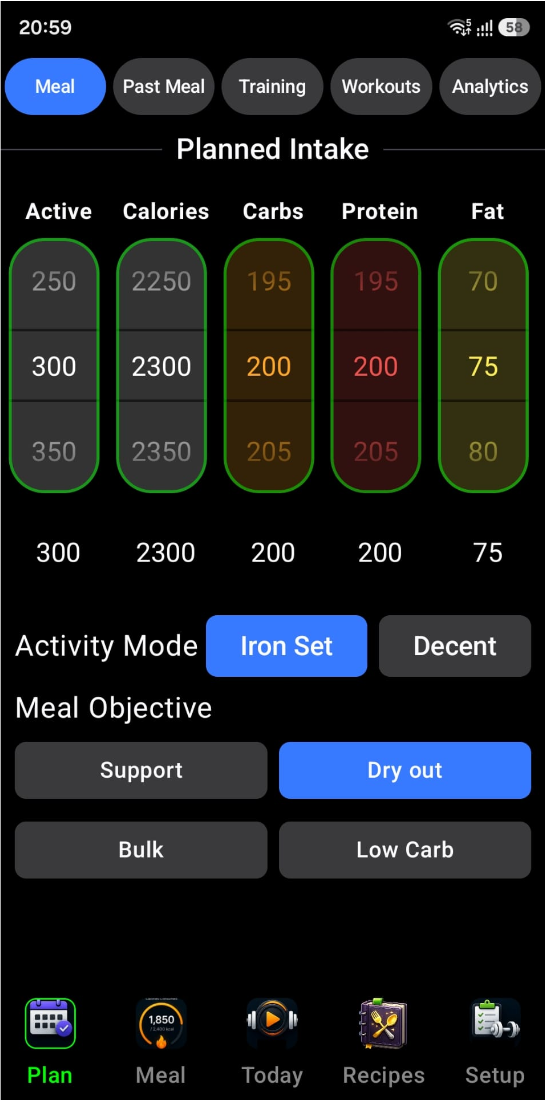
The Nutrition Goals is your nutritional "control tower." It allows you to set your daily caloric and macronutrient targets, while automatically balancing them based on your physical profile and fitness goals. Here is a detailed breakdown of its functionality.
1 The Interactive Planning Sliders
At the top of the widget, you have five vertical sliders that allow you to fine-tune your daily plan:
- Active Calories — Set how many calories you plan to burn through exercise today.
- Calories — Your total daily energy intake goal.
- Carbs, Protein, & Fat — Specific gram targets for each macronutrient.
These sliders are "Smart." For example, if you increase your "Active" calories, the widget uses your profile (age, weight, height, gender) to automatically adjust your "Total Calories" target to match your increased energy needs.
2 Activity Modes
The widget allows you to toggle between two distinct calculation modes that change how your targets are generated:
- Iron Set Mode High Performance — Optimized for active individuals and athletes using specific high-performance formulas.
- Decent Mode Standard — A more passive mode designed for maintenance or standard lifestyle activity.
3 Meal Objectives
Below the sliders is a grid of objectives (e.g., "Mass Gain," "Cutting," "Maintenance"). Selecting an objective instantly re-calculates your macro targets.
4 Real-Time Nutrient Balancing
The widget ensures that your "Calories" and "Macros" stay in sync. If you manually adjust the Protein slider, the widget internally recalculates the energy balance. It ensures the math always adds up so your plan is scientifically sound:
5 Profile Integration
The widget is reactive to your user profile. Whenever you update your weight, age, or gender in your profile settings, this widget automatically refreshes its recommendations to ensure your targets remain accurate for your current body composition.
6 Tilt-to-Scroll
Like other parts of the IronSet interface, this widget supports Tilt Interaction. If your hands are busy, you can tilt your device to scroll through the planning options, ensuring you can adjust your meal plan even in the middle of a task.
It's a dynamic calculator that turns your fitness goals into specific, actionable nutritional targets, handling all the complex math of BMR and macro-splitting in the background.
4.2 Nutrition Tracker
The Nutrition Tracker is your comprehensive nutrition and energy metabolic dashboard. It's designed to track what you eat (Intake) against what you burn (Output), providing a clear picture of your daily energy balance. Here is a detailed breakdown of its interface and functionality.
1 The Energy & Nutrition Pager (Top)
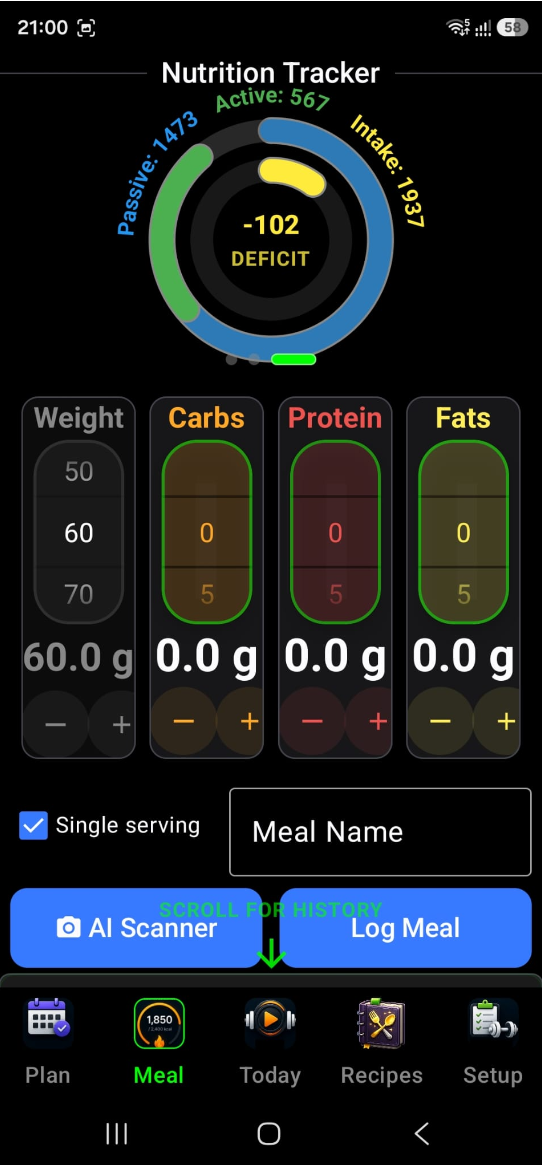
The top section features a 4-page interactive carousel that visualizes different aspects of your health:
-
Energy Balance (Calorie Rings)
— The most critical view. It shows three concentric
rings:
- Outer Ring (Green/Blue) — Your total calories burned, split into Passive (what your body burns just staying alive/BMR) and Active (exercise/movement).
- Inner Ring (Red/Yellow) — Your Calorie Balance. It visually displays if you are in a Surplus (eating more than you burn) or a Deficit (burning more than you eat).
- Macro Progress — Displays three rings (Orange for Carbs, Red for Protein, Yellow for Fats) showing how close you are to your daily targets.
- Daily Summary Card — A quick text-based summary of your Goal, BMR (Basal Metabolic Rate), total Consumed calories, and the remaining Balance for the day.
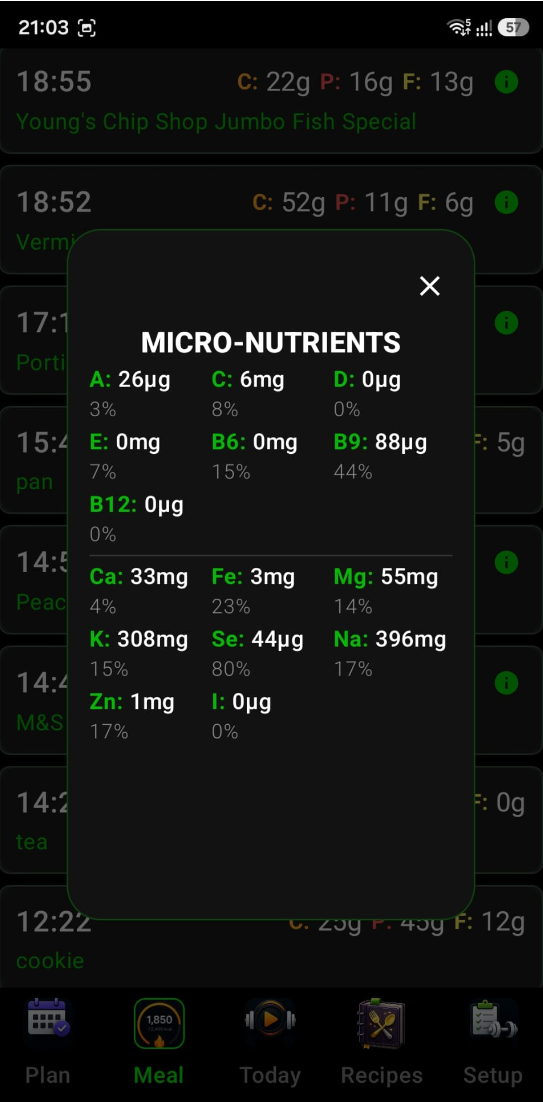
- Micronutrients Tracker — Tracks your intake of vitamins and minerals against recommended targets.
2 The AI Food Scanner Gemini AI
This is the "magic" button. By tapping AI Scanner, you can take a photo of your meal. The app uses Google Gemini AI to:
- Identify the food in the image.
- Estimate the weight/portion size.
- Automatically calculate the Carbs, Protein, and Fats.
- Suggest a meal name and populate the inputs for you, saving you from manual data entry.
3 Precision Manual Logging
If you prefer manual entry or need to tweak the AI's results, the widget provides high-precision controls:
- Vertical Macro Sliders — Four dedicated sliders for Weight (grams), Carbs, Protein, and Fats. Slide your finger to adjust values quickly or use the + and − buttons for single-gram precision.
- Portion Control — A "Single Serving" toggle allows you to quickly switch between logging a specific weight in grams or a standard "one serving" unit.
- Meal Identity — A text field to name your meal (e.g., "Post-Workout Shake") so you can recognize it in your history.
4 Interactive Feedback & Hints
- Visual Laps — The rings support "Multiple Laps." If you exceed your goal (e.g., eat 150% of your protein target), the ring will start a second, darker-colored lap to show you've gone above and beyond.
- Guided Navigation — The app uses pulsing green arrows to remind you that you can swipe horizontally for more data or scroll down to see your history.
- Logging Confirmation — When you tap Log Meal, the data is instantly saved to your history and the top rings update in real-time to reflect your new totals.
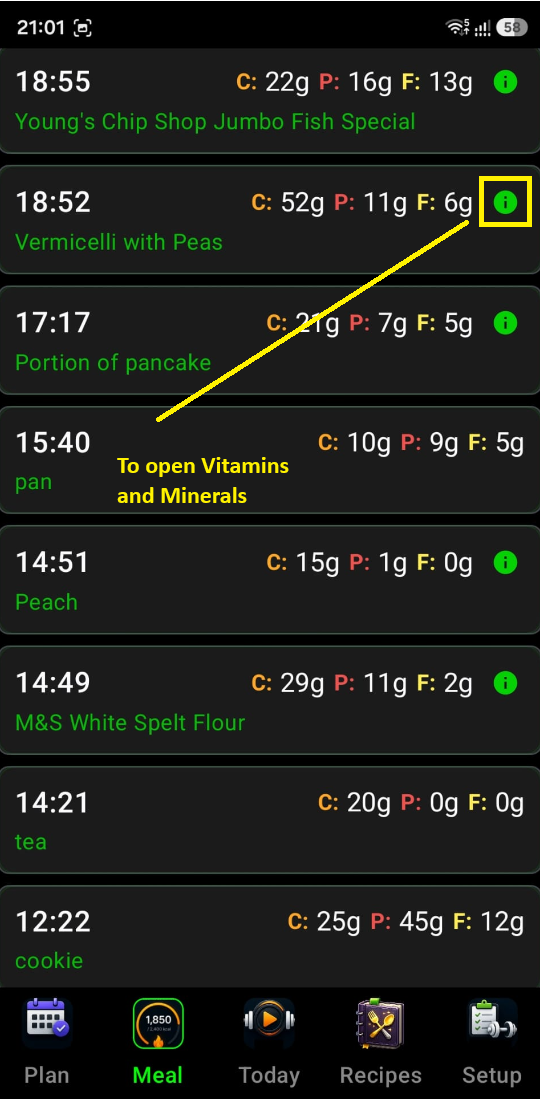
5 Meal History (Bottom)
Scrolling down reveals a chronological list of everything you've eaten today. This allows you to review your choices, see the specific breakdown of past meals, and stay accountable to your plan.
6 Tilt Navigation
Just like the workout widgets, the Energy Widget supports Tilt Interaction. You can tilt your phone to scroll through your meal history or adjust values, keeping the interface accessible even when you're busy in the kitchen.
The Energy Widget is a "Metabolic Command Center" that bridges the gap between AI-powered convenience and athlete-grade nutritional tracking.
4.3 Meal History
The Meal History widget provides a weekly grid view of your caloric intake, allowing for easy navigation between past and current weeks to ensure consistency. It is your long-term nutritional log, designed to give you a clear overview of your eating habits across weeks and days. It transforms raw meal data into a structured, navigable calendar. Here is a detailed breakdown of its interface and functionality.
1 Week-Based Navigation
At the top of the widget, you'll find a navigation bar that organizes your history by week:
- Weekly View — It displays a label such as "Week of Oct 21," showing you exactly which 7-day period you are viewing.
- Jump Between Weeks — You can use the ◀ and ▶ arrows to browse previous weeks. The interface is smart — it won't let you navigate into the future (beyond the current week).
- Automatic Focus — Whenever you open a week that includes the current day, the widget automatically scrolls to "Today" so you don't have to search for your most recent entries.
2 The Daily History Grid
The heart of the widget is a two-column grid that displays Meal Day Cards:
- Visual Summary — Each card represents a single day. It shows the date and a summary of the meals consumed on that day.
- Data Accuracy — It pulls directly from your meal history, ensuring that every snack or meal you've logged (manually or via AI) is accounted for.
- Empty States — If you didn't log anything on a specific day, the card remains as a placeholder, helping you identify gaps in your tracking.
3 Integrated Tilt Interaction
Consistent with the rest of the IronSet experience, this widget is optimized for hands-free use:
- Tilt-to-Scroll — You can scroll through your weekly grid simply by tilting your phone. The application uses your device's sensor data and translates your physical movement into smooth vertical scrolling, which is particularly useful if you are reviewing your history while multi-tasking.
4 Technical Intelligence
- Smart Grouping — The widget automatically handles the complex logic of grouping individual meal timestamps into their respective calendar days based on your local time zone.
- State Persistence — It uses run-time persistence for your current week selection, meaning if you navigate away from the widget and come back, it remembers exactly which week you were looking at.
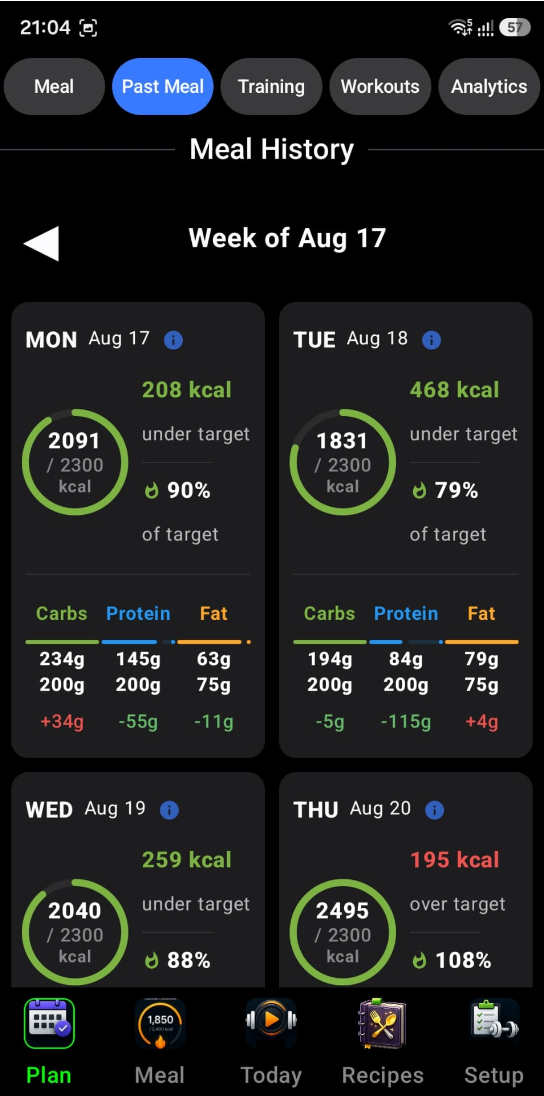
While the Energy Widget is for "right now," the Meal History Widget is for "the big picture." It allows you to spot patterns in your nutrition over time and ensures that your hard work in logging is presented in a clean, professional, and easily accessible way.